
Small Business IT Services: What Small Companies Actually Need
Small businesses often use many of the same technologies as larger organizations, but they usually have fewer employees and less […]


Small businesses often use many of the same technologies as larger organizations, but they usually have fewer employees and less time available to manage them.
A small company might depend on Microsoft 365, cloud accounting, online payments, customer databases, laptops, Wi-Fi, smartphones, shared files, and business software every day. Yet there may be no dedicated IT department.
That creates a practical question:
Which small business IT services are actually worth paying for?
The answer depends on the company, but most small businesses need some combination of technical support, device management, cloud administration, backups, and security.
The objective is not to recreate a large enterprise IT department. It is to give the business enough support to work reliably today while leaving room for future growth.
What Are Small Business IT Services?
Small business IT services are technology support and management services designed around the needs of smaller organizations.
They may include:
- Help desk support
- Computer and device management
- Network support
- Cloud services
- Microsoft 365 or Google Workspace administration
- Data backup
- Cybersecurity
- Software updates
- User and account management
- IT consulting
- Disaster recovery planning
- New-employee technology setup
Some companies outsource most of these responsibilities to a managed IT provider. Others keep routine work in-house and bring in outside specialists when needed.
There is no requirement for every small business to use the same model.
Why Small Businesses Need IT Support
A small business can sometimes operate for years without formal IT management.
That can work while the technology environment remains simple.
The situation changes when more of the business starts depending on technology.
Imagine an eight-person company where everyone uses laptops, email runs through Microsoft 365, customer files are stored in the cloud, accounting is online, and payments depend on internet-connected systems.
There may be no traditional server in the office.
It would be easy to assume the company does not really need IT support.
In reality, almost every part of the business depends on technology.
If an employee loses access to email, a laptop becomes infected, an account is compromised, or important files cannot be recovered, the lack of IT planning can quickly become a business problem.
NIST’s current small-business guidance treats cybersecurity as an ongoing business responsibility and recommends fundamentals such as MFA, backups, software updates, and employee awareness.
The Most Useful IT Services for Small Businesses
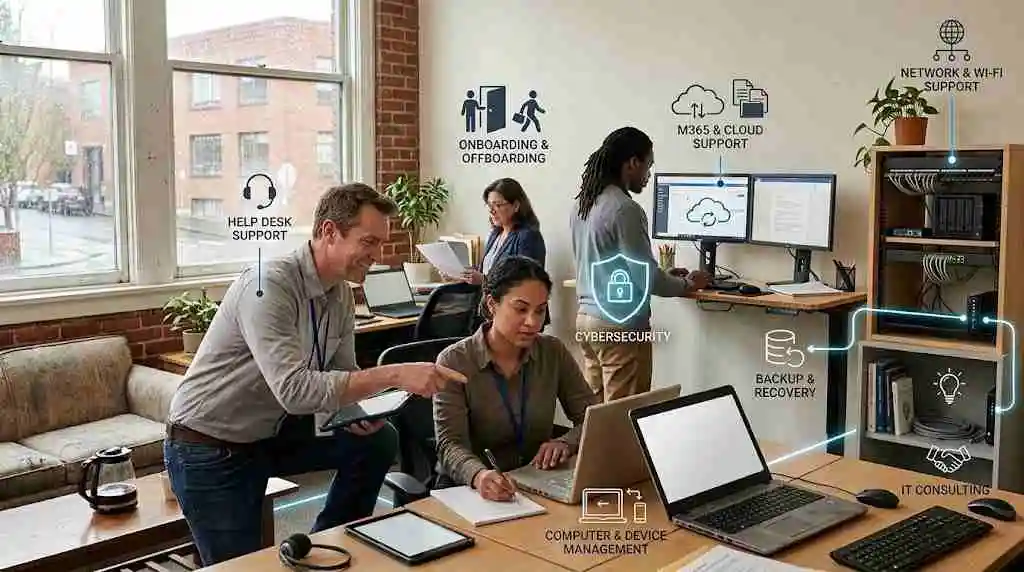
1. Help Desk Support
The first service many small businesses notice is technical support.
Employees need a clear process for getting help when something stops working.
Common requests include:
- Email problems
- Password resets
- Printer problems
- Wi-Fi issues
- Software errors
- Computer troubleshooting
- Microsoft 365 problems
- New-user setup
- Remote-access problems
Without support, employees often become their own IT department.
Someone who was hired to handle sales or accounting may end up spending an hour troubleshooting a laptop.
Professional support gives the company a more consistent way to handle these interruptions.
2. Computer and Device Management
Small businesses frequently have a mixture of devices purchased at different times.
One employee may have a newer laptop while another is using an older machine. Some computers may be updated regularly while others are overlooked.
IT services can help standardize the environment.
This may include:
- Laptop setup
- Operating-system updates
- Application installation
- Endpoint protection
- Device monitoring
- Hardware replacement planning
- Employee onboarding
- Employee offboarding
- Asset tracking
Standardization does not mean every employee needs identical hardware. It means the company knows what devices it has and how those devices are being maintained.
3. Microsoft 365 and Cloud Support
Cloud applications have made business technology easier to access, but they have not eliminated IT management.
A small company using Microsoft 365 may need help with:
- User accounts
- Microsoft 365 licenses
- Outlook
- Teams
- OneDrive
- SharePoint
- Permissions
- Security settings
- Employee onboarding
- Employee offboarding
The same principle applies to Google Workspace and other cloud platforms.
Cloud software may be hosted by someone else, but the business still controls how employees use it and who has access.
4. Network and Wi-Fi Support
A small office network may look simple.
There might be one internet connection, a wireless router, an access point, and several employee devices.
But when the connection becomes unreliable, everyone notices.
IT support can help with:
- Wi-Fi configuration
- Network troubleshooting
- Router and switch management
- Guest networks
- Secure remote access
- Network monitoring
- Internet connectivity
A properly planned network also becomes more important when employees work remotely or the business adds another location.
5. Backup and Recovery
Small businesses sometimes discover the importance of backups only after information is lost.
Important data can disappear because of:
- Hardware failure
- Accidental deletion
- Ransomware
- Software problems
- Stolen equipment
- Human error
A backup strategy should therefore answer two questions:
What data is being backed up?
Can the business restore it when needed?
NIST recommends regularly backing up business data, protecting the backups, and testing them.
For a small company, automated backups can be especially useful because they reduce dependence on someone remembering to perform the process manually.
6. Cybersecurity
Small businesses sometimes assume cybersecurity is mainly an enterprise concern.
It is not.
A small company may have fewer systems than a large organization, but it can still have valuable email accounts, financial information, customer records, credentials, intellectual property, and payment information.
Basic security measures can include:
- Multi-factor authentication
- Strong passwords
- Password managers
- Endpoint protection
- Email security
- Software updates
- Access controls
- Backup protection
- Security awareness training
- Phishing protection
NIST recommends MFA for accounts where it is available, along with strong passwords, software updates, backups, and employee cybersecurity training.
Security should be integrated into normal technology management instead of being treated as something that only needs attention after an incident.
For a broader discussion of the connection between IT operations and security, see our guide to business IT security.
7. Employee Onboarding and Offboarding
This is one of the less visible parts of IT, but it matters.
When a new employee joins, someone may need to:
- Create accounts
- Configure a laptop
- Assign software licenses
- Set permissions
- Configure email
- Set up MFA
- Provide access to shared resources
When an employee leaves, the process changes.
Access may need to be removed, devices recovered, credentials reviewed, and company information preserved.
A consistent process reduces the chance that old accounts or unnecessary access remain active.
8. IT Consulting for Small Businesses
Not every IT decision requires an ongoing managed-services contract.
Sometimes the business simply needs expert advice.
For example:
- Choosing new business software
- Moving from local storage to cloud storage
- Replacing old computers
- Improving office Wi-Fi
- Setting up remote work
- Planning a new office
- Reviewing cybersecurity
- Creating a backup strategy
A consultant can help an owner understand the options before money is committed.
Managed IT vs. Hiring an Internal IT Employee
A small business may eventually face a choice between outsourcing IT and hiring internally.
Neither approach fits every company.
Internal IT
An employee can become deeply familiar with the business and its systems.
That can be useful when the technology environment is large enough to justify a dedicated role.
The limitation is coverage. One person cannot necessarily provide every specialized skill the business may eventually need, and vacation, illness, projects, and after-hours support can create gaps.
Managed IT Provider
An outside provider can give a small company access to a wider range of technical skills without requiring a large internal department.
NIST notes that outsourcing cybersecurity to specialized third parties is common for small businesses that may not have the expertise, resources, or budget to maintain dedicated in-house support.
That does not mean outsourcing is automatically the right answer. A business should define the services it needs and understand exactly what the provider will be responsible for.
For a broader look at the different types of technology support businesses use, see our guide to business IT services.
How Much Do Small Business IT Services Cost?
There is no standard small-business IT price.
A five-person company with basic cloud applications has different requirements from a 40-person company with multiple locations and more complicated systems.
Pricing can depend on:
- Number of users
- Number of devices
- Support hours
- Security services
- Cloud platforms
- Backup requirements
- Onsite support
- Network complexity
- Compliance requirements
- Project work
Some providers charge per user. Others use per-device pricing, fixed monthly packages, hourly billing, or custom agreements.
Instead of asking only, “How much does IT support cost?” it is more useful to ask:
What responsibilities are included in the price?
Two providers can charge similar amounts while covering very different services.
How to Choose an IT Provider for a Small Business
Start with the company’s actual problems.
Make a list of:
- Current technology
- Current IT problems
- Critical applications
- Number of employees
- Number of devices
- Security concerns
- Backup arrangements
- Existing internal IT skills
- Expected growth
- Required support hours
Then ask potential providers how they would address those areas.
Useful questions include:
- What exactly is included?
- Is support remote, onsite, or both?
- How are backups monitored?
- How are security updates handled?
- How is employee access managed?
- What happens when an employee leaves?
- What happens during a security incident?
- Are after-hours services available?
- What is excluded from the monthly fee?
- How are projects billed?
The answers can reveal more than a generic list of services.
Small Business IT Services Should Grow With the Company
The technology needs of a five-person company will not necessarily remain the same at 20 or 50 employees.
As a business grows, it may add:
- More devices
- More cloud applications
- More employees
- Multiple locations
- Remote workers
- More customer data
- More complicated permissions
- Greater security requirements
NIST’s small-business guidance also recognizes that cybersecurity needs and risk-management approaches can change as organizations grow and their technology environments become more complex.
That means IT should be reviewed periodically.
The goal is not to build a complicated technology environment for its own sake. It is to make sure the business has enough support to operate reliably and securely.
A Practical Small Business IT Checklist
Before choosing or reviewing IT services, a small business should be able to answer:
- Do we know what devices we have?
- Are important accounts protected with MFA?
- Are software and operating systems updated?
- Are important business files backed up?
- Have we tested restoring a backup?
- Do employees know how to report suspicious messages?
- Are former employees’ accounts disabled?
- Does someone monitor important systems?
- Do we know who handles IT emergencies?
- Do we have a plan for a major technology outage?
If several answers are unclear, those areas deserve attention.
Final Thoughts
Small business IT services are not about buying every technology service available.
They are about covering the responsibilities that matter most to the company.
For some businesses, that may mean basic help desk support and device management. For others, it may include cloud administration, backups, cybersecurity, network management, and ongoing monitoring.
The right approach starts with understanding what the business depends on, where its current weaknesses are, and what level of support it can realistically maintain.
Technology should help a small business work more efficiently—not become another problem for the owner to manage.
admin
Practical business guides, useful tools, and technology insights from BusinessNexa.



Work smarter with practical business tools.
Explore useful calculators, guides and tools for modern businesses.