
Business IT Services and Security: How IT Management and Cybersecurity Work Together
A business can have modern technology and still have gaps in its security. A company may use laptops, cloud applications, […]
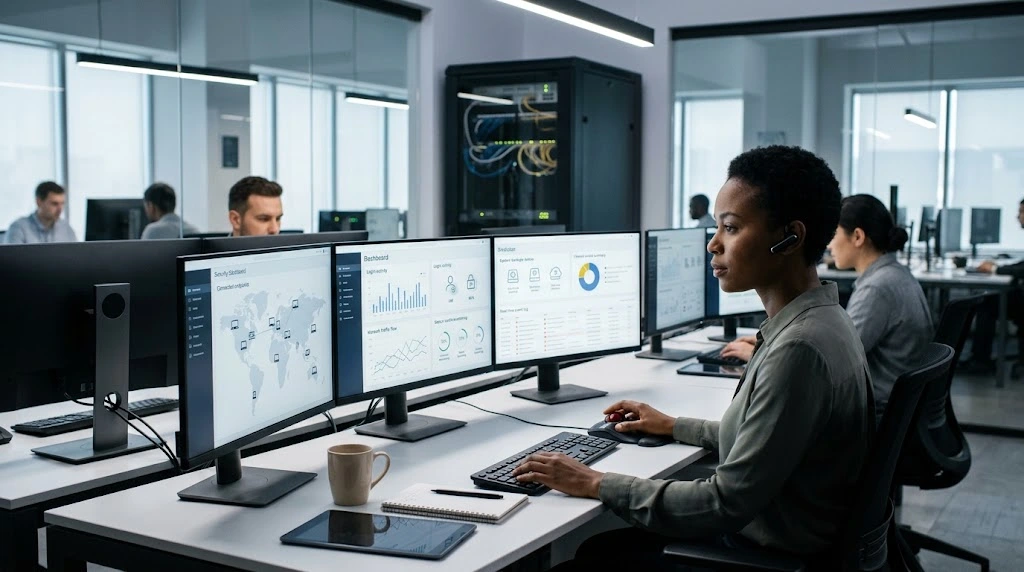

A business can have modern technology and still have gaps in its security.
A company may use laptops, cloud applications, Microsoft 365, online accounting, automated backups, and reliable internet connections. But if important accounts are poorly protected, software is not updated, access permissions are excessive, or employees are not prepared for phishing attempts, the technology environment can still create avoidable risk.
That is why business IT services and security should not be treated as completely separate subjects.
IT keeps technology available and manageable.
Security helps protect that technology, the people using it, and the information moving through it.
In practice, the two overlap constantly.
What Are Business IT Services and Security?
Business IT services and security refers to managing an organization’s technology while also protecting its systems, accounts, devices, networks, and data.
IT responsibilities may include:
- Device management
- Network administration
- Cloud services
- Software support
- User accounts
- System maintenance
- Backups
- Help desk support
Security responsibilities may include:
- Multi-factor authentication
- Endpoint protection
- Access controls
- Email security
- Security monitoring
- Software patching
- Data protection
- Incident response
- Security awareness
- Backup protection
These areas overlap because security often depends on how technology is configured and managed.
For example, MFA is a security control, but implementing it requires user-account management.
Software patching is a security practice, but keeping devices updated is also a normal IT responsibility.
Backups support recovery, while protecting those backups is also part of a broader security strategy.
Why IT and Security Need to Work Together
Consider an employee laptop that has not received important software updates.
From an IT perspective, the device is simply out of date.
From a security perspective, outdated software may expose the business to known vulnerabilities.
Now consider a former employee whose account remains active.
From an IT perspective, it is an account-management problem.
From a security perspective, unnecessary access creates additional risk.
This is why cybersecurity is not simply about installing antivirus software.
NIST describes cybersecurity as a continuous process and recommends practices including MFA, strong passwords, backups, software updates, phishing and ransomware awareness, and employee training.
Core Business IT Services and Security Areas
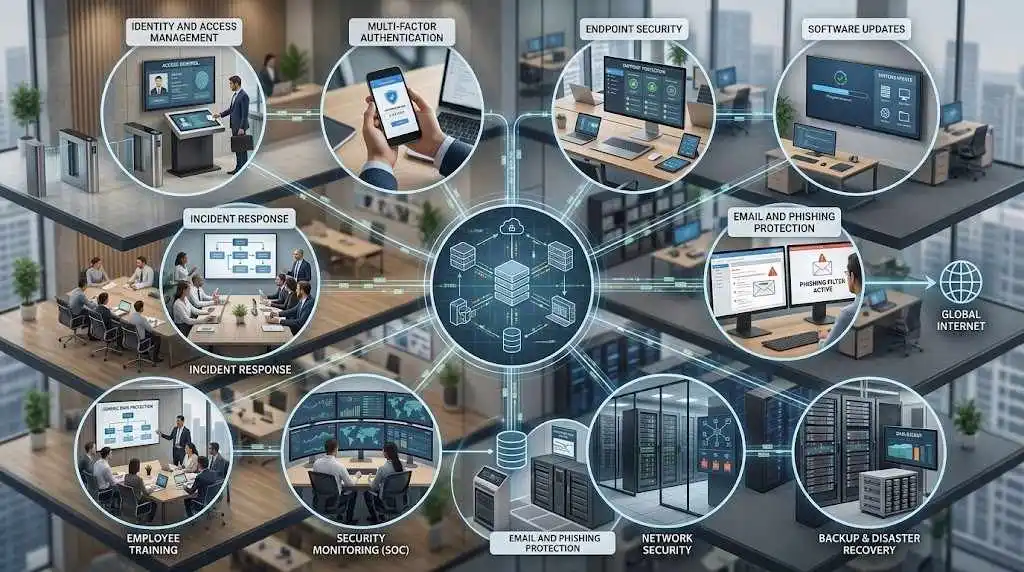
1. Identity and Access Management
Employees do not necessarily need access to every business system.
Access should generally reflect a person’s responsibilities.
For example, a sales employee may need access to the CRM but not administrative access to financial or technical systems.
IT and security teams can manage:
- User accounts
- Password policies
- MFA
- Permissions
- Administrative privileges
- Employee onboarding
- Employee offboarding
- Remote access
The objective is straightforward: give users the access they need without creating unnecessary privileges.
2. Multi-Factor Authentication
Passwords alone provide only one layer of authentication.
MFA adds another verification factor, such as an authentication app, security key, or biometric method.
NIST specifically recommends MFA for accounts where it is available and highlights its importance for protecting sensitive business systems.
Businesses can begin by prioritizing important accounts such as:
- Financial systems
- Administrator accounts
- Cloud platforms
- Password managers
- Remote-access systems
- Website administration
MFA is not a replacement for other security controls, but it can significantly strengthen account protection.
3. Endpoint Security
Employees connect to business systems through laptops, desktops, tablets, and smartphones.
Every device becomes part of the technology environment that needs to be managed.
Endpoint security may involve:
- Endpoint protection
- Device monitoring
- Security updates
- Disk encryption
- Application controls
- Device policies
- Remote management
A security policy is easier to maintain when the business knows which devices exist and who is using them.
4. Software Updates and Patch Management
Outdated software is both an IT management issue and a security concern.
Businesses use operating systems, browsers, applications, plugins, firmware, and cloud-connected tools. These technologies change over time, and vendors regularly release updates.
A patch-management process should help identify:
- Which systems need updates
- Which devices have been updated
- Which updates failed
- Which systems require special handling
- Which applications are no longer supported
NIST includes software updates and patching among its foundational cybersecurity practices for small businesses.
Automatic updates can help, but businesses should still know whether important systems are actually receiving them.
5. Email Security and Phishing Protection
Email remains central to business communication, which makes it an important security area.
Employees may receive messages that appear to come from:
- A manager
- A customer
- A supplier
- A bank
- A delivery company
- A software provider
Some messages are designed to steal credentials, redirect payments, obtain sensitive information, or persuade users to open malicious content.
Security measures can include email filtering, authentication controls, suspicious-message detection, and employee training.
Technology alone cannot eliminate phishing.
Employees should also know what suspicious requests look like and where to report them.
NIST includes phishing and ransomware awareness among the basic cybersecurity practices it recommends for small businesses.
6. Network Security
The business network connects many of its systems.
Network security may include:
- Firewalls
- Secure Wi-Fi
- Network segmentation
- VPNs
- Remote-access controls
- Monitoring
- Secure configuration
- Guest-network separation
The appropriate setup depends on the organization.
A small office that primarily uses cloud applications may have different requirements from a company running servers, multiple locations, and specialized business systems.
The starting point is understanding what the network actually needs to support and protect.
7. Backup and Disaster Recovery
Security is not only about preventing incidents.
Businesses also need to consider what happens after something goes wrong.
A ransomware incident, hardware failure, accidental deletion, or major system outage can make information unavailable.
Backups can provide a recovery option, but simply having a backup is not enough.
Businesses should consider:
- What data is backed up?
- How often is it backed up?
- Where are backups stored?
- Are backups protected from unauthorized access?
- How long are they retained?
- Can they be restored?
- How quickly can important systems be recovered?
NIST recommends regular backups and testing those backups to make sure recovery is possible.
8. Security Monitoring
A business cannot respond quickly to an event it does not notice.
Monitoring can help identify unusual activity, repeated failed logins, suspicious behavior, system failures, or other events that deserve investigation.
Depending on the organization, monitoring may be handled internally or through a managed provider.
Larger organizations may use services such as managed detection and response, security information and event management, vulnerability management, or security operations centers.
Smaller businesses do not necessarily need every one of these services. The appropriate level depends on the organization’s systems, information, industry, contractual requirements, and resources.
9. Employee Security Training
Technology cannot solve every security problem.
Employees interact directly with email, customer information, financial systems, files, and business applications.
Training can cover:
- Phishing
- Password management
- MFA
- Suspicious attachments
- Social engineering
- Safe browsing
- Security incident reporting
- Handling sensitive information
The goal is not to turn every employee into a cybersecurity specialist.
It is to help employees recognize unusual situations and know what to do when something does not look right.
10. Incident Response
Even well-managed environments can experience security incidents.
A business should know what happens when something suspicious occurs.
An incident-response plan can define:
- Who should be contacted
- How affected systems should be isolated
- Who investigates the event
- How relevant information is preserved
- When passwords should be reset
- How backups will be used
- Who handles required notifications
- How normal operations will be restored
The exact response depends on the incident and the business.
The important part is having responsibilities defined before an emergency occurs.
Business IT Services vs. Security Services
These terms overlap, but they are not identical.
| Business IT Services | Security Services |
|---|---|
| Help desk | Threat monitoring |
| Device management | Endpoint protection |
| Cloud administration | MFA |
| Network management | Access controls |
| Software support | Vulnerability management |
| User management | Security monitoring |
| Backup management | Incident response |
| IT planning | Security risk management |
In a small organization, the same provider may handle both sides.
In a larger company, separate IT operations and cybersecurity teams may have different responsibilities.
What matters is that those responsibilities are clearly defined and coordinated.
Should Small Businesses Combine IT and Security?
For many smaller companies, maintaining separate IT and security departments may not be practical.
A business may instead work with an IT provider that includes appropriate security controls within its services.
That can simplify responsibility for areas such as:
- Employee devices
- Microsoft 365
- Software updates
- Endpoint protection
- MFA
- Backups
- Network infrastructure
- Security monitoring
However, businesses should understand exactly what is included.
“IT support” does not automatically mean comprehensive cybersecurity.
NIST notes that small businesses commonly outsource cybersecurity needs to specialized providers when they do not have the expertise, resources, or budget for dedicated in-house support. It also emphasizes defining responsibilities and expectations in the service agreement.
For a broader look at general technology management, see our guide to business IT services.
What Should a Small Business Prioritize?
A small company does not necessarily need a large enterprise security stack.
It should start with fundamentals.
Secure important accounts
Enable MFA on email, financial, administrative, cloud, and other sensitive accounts where available.
Keep systems updated
Make sure operating systems, browsers, applications, and security tools receive updates.
Protect business devices
Use appropriate endpoint protection and secure configurations.
Back up important data
Automate backups and periodically test restoration.
Control employee access
Give employees access based on their responsibilities and remove access when they leave.
Train employees
Teach people how to identify phishing attempts and report suspicious activity.
Prepare for incidents
Know who is responsible if a device is compromised or an account is suspected of being breached.
NIST’s Cybersecurity Framework 2.0 Small Business Quick-Start Guide provides a structured starting point for organizations with modest or no cybersecurity plans and emphasizes adapting risk management to the organization’s circumstances.
How IT Security Changes as a Business Grows
Security requirements can become more complicated as an organization grows.
A five-person company may have a small number of devices and cloud applications.
At 50 employees, the company may have:
- Multiple departments
- More applications
- More user accounts
- More sensitive information
- Multiple locations
- Remote employees
- More complicated permissions
- More devices
- More vendors
The technology environment becomes larger, which means there are more systems and access points to manage.
That is why security should be reviewed when the business changes rather than treated as a one-time project.
A Simple Business IT Security Checklist
Use this as a starting point:
- Important accounts use MFA
- Employees use strong, unique passwords
- Business devices are protected
- Operating systems and applications are updated
- Important data is backed up
- Backups are periodically tested
- Employee access is reviewed
- Former employees lose access
- Email security controls are configured
- Employees receive phishing awareness training
- Important security events are monitored
- The business has an incident-response process
- IT responsibilities are clearly assigned
- Security responsibilities are clearly assigned
A checklist cannot replace a complete security assessment, but it can reveal areas that deserve attention.
Final Thoughts
Business IT services and security work best when they are treated as connected parts of the same technology environment.
IT management keeps systems available, users productive, and technology maintained. Security controls help protect those systems, users, and information from unauthorized access and disruption.
The appropriate combination depends on the size of the business, the technology it uses, the information it handles, its industry, and its specific requirements.
For smaller organizations, a sensible starting point is often the fundamentals: reliable IT support, secure accounts, updated devices, controlled access, dependable backups, employee awareness, and a clear response process.
As the company grows, those foundations can develop into a more formal IT and security program.
admin
Practical business guides, useful tools, and technology insights from BusinessNexa.


Work smarter with practical business tools.
Explore useful calculators, guides and tools for modern businesses.